Author Markdown
Implementers of Canopy IIIF can author contextual content to support Manifest resources using formatted Markdown files. These files are stored in the /content directory of your project. In doing so, you can add context to items in your IIIF Collection and craft a custom experience using integrated components provided by Canopy IIIF.
Note: This guide assumes have you already created a Canopy IIIF project. Follow Create a Project first if you are starting from scratch.
1. Create a Markdown file
- In your
contentdirectory, find theaboutsubdirectory and create the new fileburial-customs.mdx. - Add the following barebones Markdown and front matter to your file and save.
Your file is now accessible at the relative route /about/burial-customs and would render as:
Example: Burial Customs and Colonial Fascination
Stories of death and burial customs among Mughal and Hindostan peoples have long fascinated colonial observers. This interest often stemmed from a mix of curiosity, exoticism, and a desire to document practices perceived as "other." Such accounts were frequently filtered through colonial perspectives, which could lead to misunderstandings or misrepresentations of local beliefs and rituals surrounding death.
In many cases, these narratives were used to justify colonial rule by portraying indigenous practices as primitive or in need of reform. The fascination with burial customs also intersected with broader themes of power, control, and the imposition of European norms on colonized societies.
In particular, the custom of a woman self-immolating on her husband's funeral pyre, known as sati, was sensationalized in colonial literature. While sati was practiced in certain regions and periods, its portrayal often lacked nuance and failed to consider the complex social, religious, and economic factors that influenced such practices.
2. Add a IIIF Viewer
After creating the basic Markdown file, you can enhance it by adding a IIIF viewer component to display an item from your IIIF materials. Canopy provides a Clover IIIF Viewer component that can be used to display IIIF resources within Markdown.
- Add a
<Viewer />component to the within your content and reference a IIIF Manifest with theiiifContentproperty. - Adjust options as desired to customize the viewer experience.
Example: Burial Customs and Colonial Fascination
Stories of death and burial customs among Mughal and Hindostan peoples have long fascinated colonial observers. This interest often stemmed from a mix of curiosity, exoticism, and a desire to document practices perceived as "other." Such accounts were frequently filtered through colonial perspectives, which could lead to misunderstandings or misrepresentations of local beliefs and rituals surrounding death.
In many cases, these narratives were used to justify colonial rule by portraying indigenous practices as primitive or in need of reform. The fascination with burial customs also intersected with broader themes of power, control, and the imposition of European norms on colonized societies.
In particular, the custom of a woman self-immolating on her husband's funeral pyre, known as sati, was sensationalized in colonial literature. While sati was practiced in certain regions and periods, its portrayal often lacked nuance and failed to consider the complex social, religious, and economic factors that influenced such practices.
3. Add title, description, and referenced items
As a digital humanist, you might have authored a series of essays in Markdown (in the /content directory), in which you wish to reference or cite one or more items in the source IIIF Collection. Canopy offers an easy method for linking scholarly content to items in their collection using the referencedManifests front matter key. This key takes an array of IIIF Manifest URIs. The Manifests MUST be in the source IIIF Collection of the Canopy project.
- Add the
referencedManifestskey to the front matter with an array of Manifest URIs. - Add a
<ReferencedItems />component to bottom of our Markdown file. This will render the items as Figures in a responsive grid. Each item will have output relative local link to the item, athumbnail, and thelabel.
Example: Burial Customs and Colonial Fascination
Stories of death and burial customs among Mughal and Hindostan peoples have long fascinated colonial observers. This interest often stemmed from a mix of curiosity, exoticism, and a desire to document practices perceived as "other." Such accounts were frequently filtered through colonial perspectives, which could lead to misunderstandings or misrepresentations of local beliefs and rituals surrounding death.
In many cases, these narratives were used to justify colonial rule by portraying indigenous practices as primitive or in need of reform. The fascination with burial customs also intersected with broader themes of power, control, and the imposition of European norms on colonized societies.
In particular, the custom of a woman self-immolating on her husband's funeral pyre, known as sati, was sensationalized in colonial literature. While sati was practiced in certain regions and periods, its portrayal often lacked nuance and failed to consider the complex social, religious, and economic factors that influenced such practices.
[essay continues...]
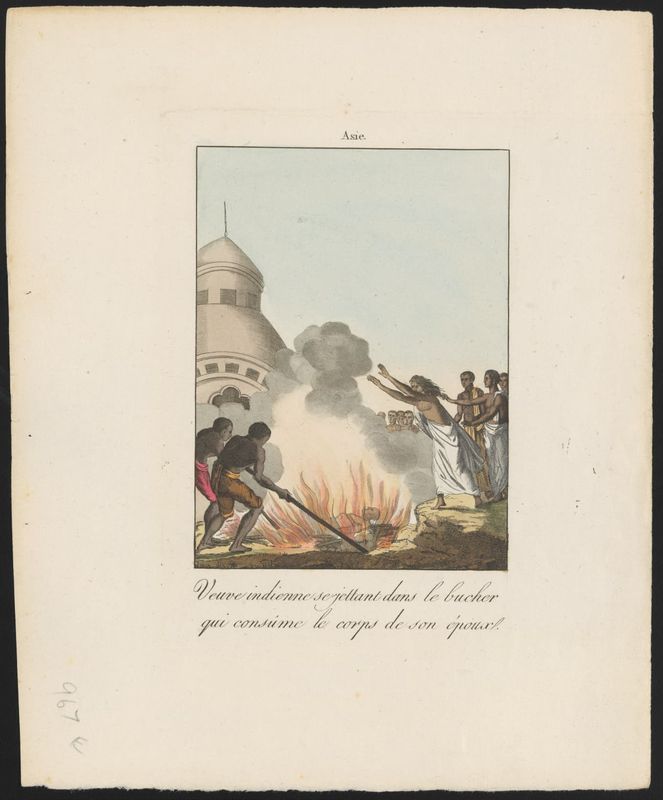
The referenced items links back to each IIIF work page. When a work is cited anywhere, a "referenced by" section appears with links to the relevant Markdown pages.
Your page should now output a grid of items that are referenced in the front matter. Automatically, a reciprocal connection is made between the Markdown content and the items in the IIIF Collection. Users can now navigate to and from the scholarly content page and the relative /work page representing the Manifest.